The Missing Reference

The film
Storyboard
Scene 1
1 shot · 5sShot 1 · establishing · 5s
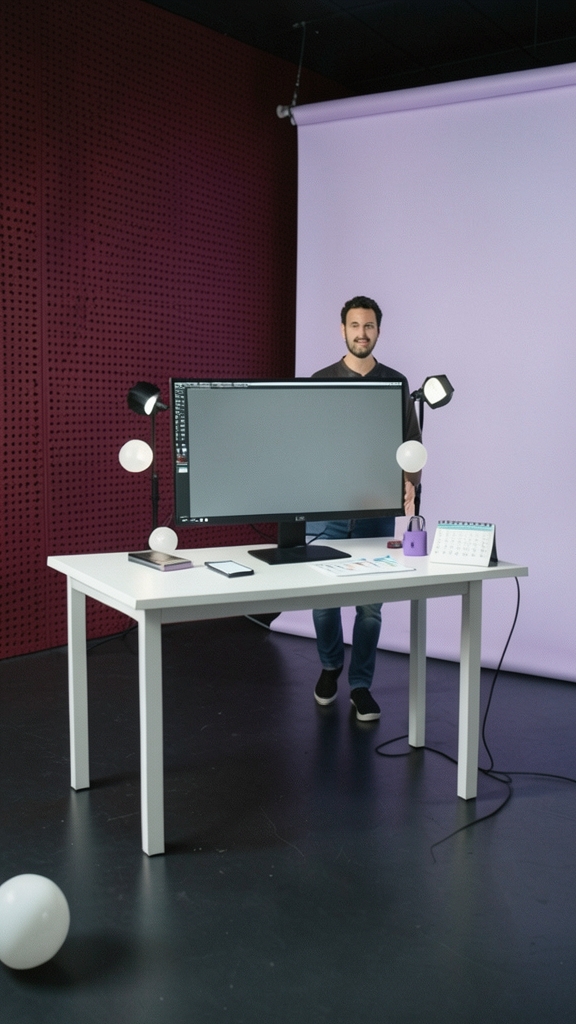
The creator prepares to analyze the reference Reel, surrounded by the tools and visual language of a minimalist production studio.
Scene 2
1 shot · 5sShot 2 · over-shoulder · 5s
The creator searches for the reference video, but the empty upload area makes clear that no reference has been provided.
- The Creator: No reference video is attached.
Scene 3
1 shot · 5sShot 3 · medium · 5s
Instead of pretending to analyze unavailable footage, the creator turns the requested aesthetic into a clear production blueprint using the specified visual elements.
- The Creator: I can still build the visual blueprint.
Scene 4
1 shot · 5sShot 4 · close-up · 5s
The creator completes the proposed sequence with the floating smartphone, secure dashboard, and calendar roadmap, turning the missing reference into a usable generation plan.
The story
Original input — click to expand
“Act as a professional AI video reverse-engineering expert, cinematic director, and advanced text-to-video prompt engineer. My goal is to recreate the reference Instagram Reel as closely as possible using AI video generation. REFERENCE VIDEO: [Attach the original video or upload the downloaded Reel here] First, analyze the entire reference video frame by frame. Identify every scene, subject, character, action, facial expression, background detail, camera angle, camera movement, lighting setup, color grading, transition, visual effect, pacing, and audio element. Then create a highly detailed video-generation prompt that reproduces the reference video's visual style and sequence as closely as possible. REQUIREMENTS: 1. Match the original aspect ratio, duration, visual composition, and pacing. 2. Describe every scene in chronological order, including timestamps. 3. Specify subject appearance, position, movement, gestures, and expressions. 4. Describe the environment, background, props, textures, and atmosphere. 5. Specify camera framing, lens characteristics, camera movement, depth of field, and focus changes. 6. Match the lighting, shadows, color palette, contrast, and overall visual style. 7. Reproduce the timing and style of transitions, slow motion, speed ramps, and visual effects. 8. Include text overlays, subtitles, and their timing if present. 9. Describe the audio, sound effects, ambience, and music timing separately. 10. Maintain visual consistency across all scenes. 11. Avoid adding any objects, characters, actions, or effects that are absent from the reference. 12. If the video is too long for one generation, divide it into short clips with precise continuity instructions. OUTPUT FORMAT: A. Reference video breakdown B. Complete master video prompt C. Individual scene prompts with timestamps D. Camera movement and lighting instructions E. Negative prompt to avoid unwanted artifacts F. Audio and sound-design prompt G. Recommended generation settings, including aspect ratio, duration, frame rate, and resolution H. Editing instructions to combine all clips into one finished video To help you recreate or generate high-quality assets matching this style of 3D minimalist UI animation and aesthetic character elements, here are the professional prompts broken down by style and key scenes: 1. 3D Minimalist UI & Floating Object Style (For Midjourney, DALL-E 3, or 3D Render Engines) > Prompt: A vertical 9:16 3D minimalist aesthetic scene featuring glossy pastel purple and white elements, soft studio lighting, floating spheres, clean UI card components with drop shadows, a sleek smartphone mockup displaying social media interfaces, purple padlock and growth charts, smooth claymation-like texture, modern vector graphic style, photorealistic rendering, clean composition --ar 9:16 --v 6.0 > 2. Anime-Style Character Avatar (For Consistent Character Generation) > Prompt: A professional 2D anime-style character sheet of a young Asian male creator with messy black hair, wearing a modern black hoodie, confident expression, clean lines, cel-shading, soft studio background, high quality, vector art illustration --ar 9:16 --v 6.0 > 3. Scene-by-Scene Visual Prompt Blueprint (For Video Generators like Sora or Runway) * Intro Scene: A 3D smartphone floating against a dark crimson dotted-grid background, displaying a bright red YouTube Shorts play button icon with clean interface elements and smooth camera pan. * Upload/Lock Element: A clean white dashboard card floating in a soft pastel lavender space with glossy purple spheres in the background; a cursor clicks an "Upload" button next to a secure purple padlock with a loading bar. * Roadmap / Calendar Scene: A 3D desktop calendar page flipping to "Day 1", surrounded by floating YouTube icons and minimal checklist interface panels with checkmarks and icons (camera, megaphone, clock).”
Make a film like this
Write a paragraph — TaleScene turns it into a voiced cinematic (live action) film with the same faces in every shot.