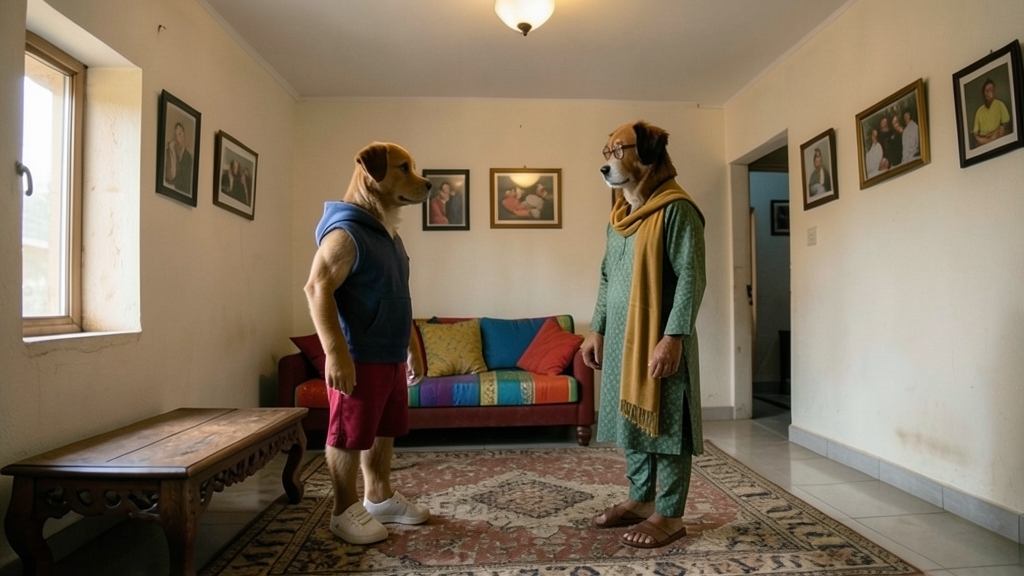
Puppo and Khala's Totkay

The film
Storyboard
Scene 1
1 shot · 6sShot 1 · establishing · 6s
Puppo and Khala’s supplied homepage picture becomes the first living moment: the familiar home awakens as both characters begin moving naturally while the original reference appearance remains unchanged.
Scene 2
1 shot · 8sShot 2 · medium · 8s
Khala demonstrates one of her playful totkay while Puppo watches closely, copying her hand movement and reacting with growing curiosity.
Scene 3
1 shot · 9sShot 3 · over-shoulder · 9s
A funny ghost moment interrupts the home routine: Puppo notices a strange shape in the hallway, and Khala joins him as the supposed ghost moves in an unmistakably comic way.
Scene 4
1 shot · 9sShot 4 · wide · 9s
Back in the living room, Puppo and Khala turn the funny ghost scare into a warm shared success, moving naturally together and ending on the same home that opened the film.
The story
Original input — click to expand
“Convert all my supplied images into a complete animated video using the FREE version only. IMPORTANT REQUIREMENTS: 1. Use ONLY free features. Do not use Pro features, paid effects, paid credits or paid export options. 2. Convert all supplied scene pictures into one continuous video. 3. Use my FIRST supplied homepage picture, the Puppo aur Khala ke Totkay DP/banner picture, as the FIRST opening frame. 4. Keep the original character reference images exactly as supplied. 5. Make Puppo and Khala look alive and animated in every scene. 6. Characters should walk, move their hands, turn their heads, blink, change facial expressions and interact naturally according to each scene. 7. The characters must look like they are talking through natural mouth movements, but DO NOT generate any dialogue, voiceovers or audio. 8. DO NOT add subtitles, captions, written dialogue or narration. 9. Keep all original scenes in their correct story order. 10. Use natural character movements, cinematic camera movements and smooth transitions. 11. Maintain consistent character faces, clothing, colors and 3D cartoon appearance throughout the video. 12. Keep the ghost scenes funny and animated. 13. Use 16:9 widescreen format. 14. Do not replace my supplied pictures with newly generated characters. 15. Do not create a storyboard or slideshow. Animate the supplied pictures into moving scenes. FINAL OUTPUT: One complete animated video using all my supplied pictures, with moving characters and natural expressions, ready for me to add my own Urdu dialogues, voiceovers, subtitles and sound effects later. FREE VERSION ONLY. No payment, no subscription and no Pro features. If any feature is paid, use a free alternative instead.”
Make a film like this
Write a paragraph — TaleScene turns it into a voiced cinematic (live action) film with the same faces in every shot.